Guides
Quiet mechanical keyboards: where the sound comes from
Quiet mechanical keyboards differ in switch, case, and desk noise. Learn the four sounds, what silent switches damp, and how setup changes what you hear.
Most quiet mechanical keyboards are quiet in one narrow way. The maker damped the loudest event and left the rest alone. If you share a room, or you type with a microphone open, the rest is what people keep hearing.
What to take away
- A keyboard makes at least four separate sounds. A silent switch addresses two of them.
- The case and the desk under it change the result as much as the switch does.
- Typing habit moves the noise more than most parts do. Bottoming out hard cancels the damping you paid for.
- This site does not rank products or publish decibel figures, because nothing here has been measured under a stated method.
The four noises
Take one keypress apart and listen for four distinct sources:
- Bottom-out impact:
- the downstroke sound as the stem reaches the bottom of its travel.
- Return impact:
- the upstroke sound as the stem returns.
- Spring ping:
- noise from the spring vibrating inside the switch.
- Stabilizer rattle:
- noise from the stabilizers on larger keys.
Four noises and what reduces each
Sound
- Downstroke
- Stem hits housing
- Upstroke
- Stem hits top housing
- Spring
- Coil vibrates inside
- Rattle
- Wire stabilizers shift
Source
- Downstroke
- Rubber pads, softer caps
- Upstroke
- Damped stems, lubricant
- Spring
- Lubricant, tighter spring
- Rattle
- Clip, lube, replace
Reduced by
- Downstroke
- Upstroke
- Spring
- Rattle
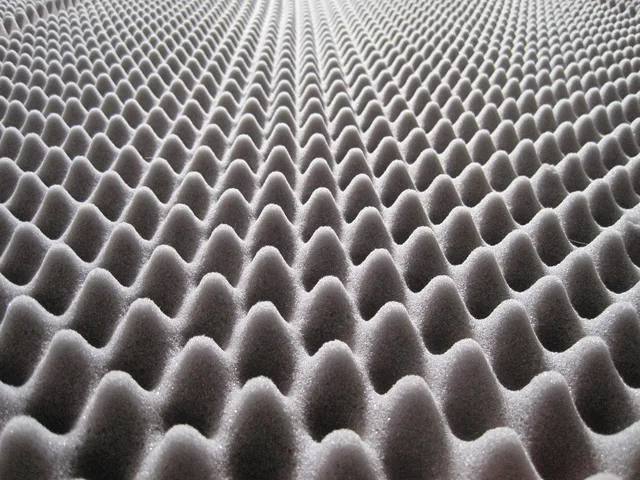
Case resonance sits on top of all four. An empty plastic shell rings; the same switches in a heavier case with closed-cell foam inside sound lower and shorter. Two boards with identical switches can sound nothing alike.
What a silent switch does and does not do
Silent variants put a rubber damper on the stem so plastic never meets plastic hard at either end of the travel. The bottom-out thud drops and the return click mostly disappears, but the spring, stabilizers, and sound of a fingernail on a keycap are untouched. Examples include Cherry MX Silent Red, Gateron Silent, Zeal Zilent, and Kailh Silent Box switches; a silent switch does not make the whole keyboard silent. How the mechanisms differ is the subject of a switch comparison.
The desk is part of the instrument
A thin, hollow desk radiates whatever you put on it, and so does a keyboard tray with a long unsupported span. Mass or a dense mat under the board is cheaper than a new keyboard, and it works on the low frequencies that carry through walls and floors.
Moving keyboard back cuts wrist strain
- 83%Right wrist flexion
- 89%Radial deviation
In a motion-capture study of twelve typists, moving the keyboard eight centimeters back from the desk edge cut right wrist flexion by 83 percent and radial deviation by 89 percent versus typing at the edge. The linked study compared wrist and elbow angles at three keyboard distances.
Pushing the board back gives forearms a place to rest, which usually means less force per keystroke.
Changes that cost nothing
- Type with less force. Most switches fire around halfway down, so bottoming out is optional.
- Move the board back from the desk edge and let your forearms carry some weight.
- Put something dense between the keyboard and a hollow surface.
- Clear the flat surfaces beside the board, since they reflect sound back at you.
OSHA's Computer Workstations eTool, in its keyboard placement and design guidance, treats height, distance and use as one problem rather than three, which is the right instinct here. The keyboard, the chair and the desk get adjusted together or not at all.
How to read a quiet claim
Ask what was measured, where the microphone sat, and what the board sat on. A claim with no method is a preference, so ask whether it covers upstroke and downstroke, since a board can be much quieter down and no quieter up.
Those questions form a practical buyer checklist: check the test method, microphone position, surface, and whether both upstroke and downstroke were included.
Common questions
Is a membrane keyboard always quieter than a mechanical one?
Do rubber o-rings under the keycaps work?
Will lubricating switches make a keyboard silent?
Does a louder keyboard mean a better one?
In this guide
- Quiet mechanical keyboards privacy and soundQuiet mechanical keyboards privacy and sound call for separate checks: compare force curves, test damping, and treat software separately.
- What a quiet keyboard comparison should measure: the honest pictureQuiet mechanical keyboards reviews: no product ranking is given here. Instead, the properties that separate quiet keyboards, why most published comparisons fail.
- Quiet mechanical keyboard mistakes and cheap checks before you buyThe costly errors people make chasing a quieter mechanical keyboard, from buying before diagnosing to ignoring hand pain, and the cheap checks that catch each one.
- A buyer checklist for quiet mechanical keyboards, from switch feel to priceA checklist for buying a quiet mechanical keyboard: what to measure in your own room first, what to ask a seller, and which answers should stop the purchase.