Costs
Free first: four columns for quiet keyboard buying
Sort quiet keyboard buying into four columns — free adjustments first, one-off gear, recurring parts and a contingency line — and keep desk extras separate.
This page does not quote keyboard or accessory prices. It gives you a four-column method for sorting quiet keyboard costs — free adjustments first, then one-off purchases, recurring parts and a contingency line — using prices you collect yourself, plus a warning about what that spending can and cannot do.
What to take away
- Budget the workstation, not just the quiet keyboard. The keyboard is rarely the largest line; keep other desk purchases separate from noise-control items.
- Separate one-off spend from recurring spend before comparing anything.
- The measurable returns from workstation changes are real but modest, so plan for a small improvement rather than a fix.
- If you are self-employed, some of this may be deductible, which changes the true cost but not the decision order.
Sort purchases into four columns
| Column | Contents | Notes |
|---|---|---|
| Free | Position, height, hours, typing force | Do these before pricing anything |
| One-off | Keyboard, mat, tray, chair, arm | Include shipping and returns |
| Recurring | Pads, seals, keycaps, stabilizer parts | Estimate per year, not per purchase |
| Contingency | The second attempt | Assume one purchase misses |
The contingency column is the honest one. Most people buy twice in this category, because the first purchase treats the wrong noise.
Four-column keyboard budget
Free
- What goes in
- Position, height, hours
- Timing
- Before pricing
- Priority
- Highest, zero cost
One-off
- What goes in
- Keyboard, mat, tray
- Timing
- Include shipping
- Priority
- Upfront
Recurring
- What goes in
- Pads, seals, keycaps
- Timing
- Estimate per year
- Priority
- Annual
Contingency
- What goes in
- The second attempt
- Timing
- Assume one miss
- Priority
- Honest buffer
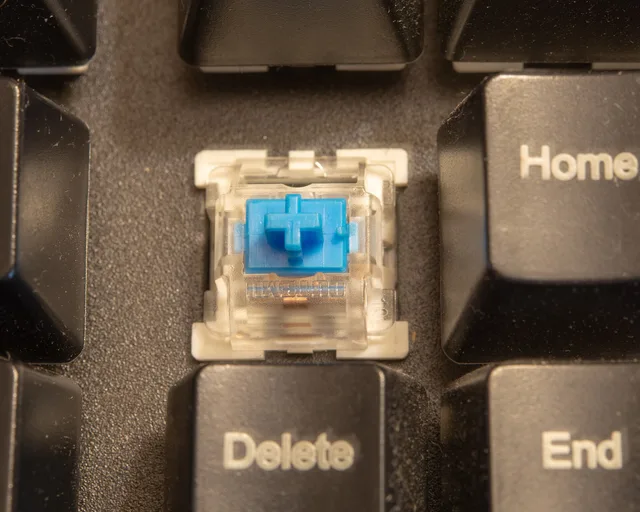
Apply the free column to keyboard position, sitting height, typing hours and typing force before ordering parts. In the one-off column, list the keyboard itself, a desk mat, a keyboard tray, a switch change to silent linear or silent tactile models, and any dampening you add inside the case: plate foam, case foam, silicone or a gasket-mounted build. Put consumables you expect to redo — O-rings, stabilizer lube, a spare keycap set, replacement foam — in the recurring column. Keep any chair, monitor arm or other comfort upgrade on a separate line so its purpose is not confused with reducing keyboard noise.
Fill the recurring column honestly
Recurring is the column people leave blank, and it is the column that makes the method work. List what wears out or what you expect to redo — case foam that compresses, O-rings that stiffen, stabilizer lube that dries, the pad under the board, a spare keycap set — and note beside each item how often you expect to replace it. A part you buy once belongs in the one-off column, however small it is.
The free column stays at zero cost and stays first. If shortening your typing day, easing your typing force and putting the keyboard at the right height quiet the room enough, the other three columns can stay empty, and an empty column is the cheapest result the method can produce.
Keep desk-comfort extras separate
A workstation is more than the input device, and the forgotten items are the ones that force awkward postures. A page held flat on the desk pulls the head down and sideways all day; a holder that puts it at the height and distance of the screen costs almost nothing.
The same goes for a monitor riser, a footrest, and a headset for long calls. None of them are interesting and all of them are cheaper than the problem they prevent. Put them in the one-off column at the start rather than discovering them one at a time.
Separate noise-control goals from symptom relief
Workstation changes are worth making, but the measured effects are smaller than marketing implies, and the evidence below concerns standing and walking at work, not keyboard noise. A Cochrane review pooled ten studies with 955 participants and found no significant difference in the intensity of low back or upper back symptoms in the short term from sit-stand or treadmill workstations, on low quality evidence. That is not an argument against a better desk; it is an argument against budgeting as though one purchase will end a symptom, and a reason to keep the contingency column in the plan.
Treat workspace tax questions separately
Tax treatment changes the real cost, and the IRS says the home office deduction is available to homeowners and renters alike.
The simplified option applies a $5 per square foot standard deduction for the home used for business, up to a maximum of 300 square feet, in place of named expenses. The regular method uses actual expenses such as utilities, insurance, repairs and depreciation and reports them on IRS Form 8829.
Whichever applies affects your after-tax number, not the priority order, so build the budget first and apply the tax question afterwards.
Fill in the worksheet before you shop
Set a total, allocate it across the four columns, and hold the free column at zero cost and highest priority. Then compare candidates on total cost of ownership rather than sticker price: the keyboard plus everything it needs to sit and sound right on your desk.
Worked example: sorting one noisy board
Take a mechanical keyboard that rattles in a shared room. The free column comes first: less typing force, shorter sessions, and a check of what the desk is amplifying. The one-off column then lists the keyboard's own plate foam and case foam, a gasket-mounted case, a desk mat, a tray, and a move to silent linear or silent tactile switches. The recurring column holds O-rings, stabilizer lube, replacement foam and any keycaps you plan to swap. The contingency column is the second attempt, because the first combination of switches, foam and mat is often not the one that stays.
Common questions
How much should I set aside?
Is a more expensive keyboard quieter?
Should I buy everything at once?
What is the most commonly underestimated cost?
In this guide
- Quiet keyboard costs: what privacy rules add at a home deskQuiet keyboard costs under privacy rules: a second board, a switch, compliant storage, disposal and your own time, plus how to keep the extra board quiet.
- How to compare the total cost and service life of a quiet keyboardA method for comparing a quiet keyboard's total cost per year using purchase price, service life, wear parts, accessories and return shipping.
- Ten-question cost checklist for buying a quiet keyboardTen cost questions to answer before spending, from what the free changes did to what the parts cost, with the answers that should stop a purchase.