Reviews
Part of Keyboard brands in 2027: four checks that need no company name
Input options for a shared desk in a small room, 2027 edition
Input options for a shared desk in a small room include compact keyboards, wireless mice and thin mats chosen for fit, easy movement and quick switching.
Input options for a shared desk in a small room come down to fit, weight and sound. A small shared room decides the gear before comfort or quiet gets a vote. The board has to suit two people and go away at night.
What to take away
- Buy the smallest layout you can type on. A 60% board such as the Keychron K7 Pro recovers desk depth that your mouse arm needs.
- Shared gear needs adjustment range, not one perfect setting. A fixed compromise is wrong for both users.
- Low-profile boards with short key travel are the quietest stock option. A 3 mm travel board on a dense mat beats a loud board on a bare desk.
- Weight matters more than wireless. A 400 g board like the NuPhy Air60 V2 gets moved; a 1 kg board gets left where it is.
- Check the return window before you buy. Switch feel and sound are personal, and no spec sheet predicts them.
Boards that fit a shared desk
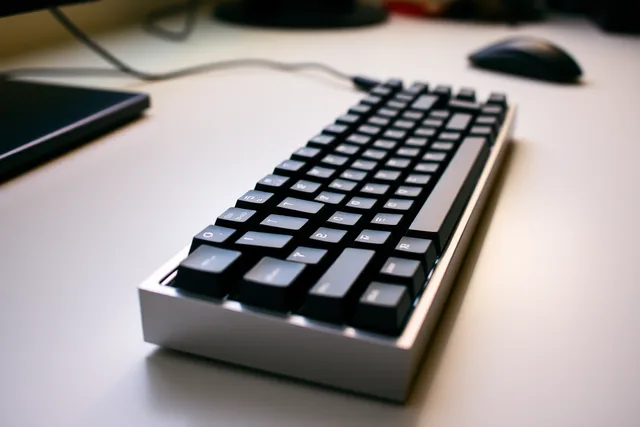
Keychron K7 Pro. A 65% low-profile wireless board, roughly 300 x 110 mm, with hot-swap sockets and a gasket mount. Keychron publishes its own specs, and the low-profile version is the quiet one. It typically costs $90 to $120 depending on switches and backlight. It suits a desk that gets cleared nightly.
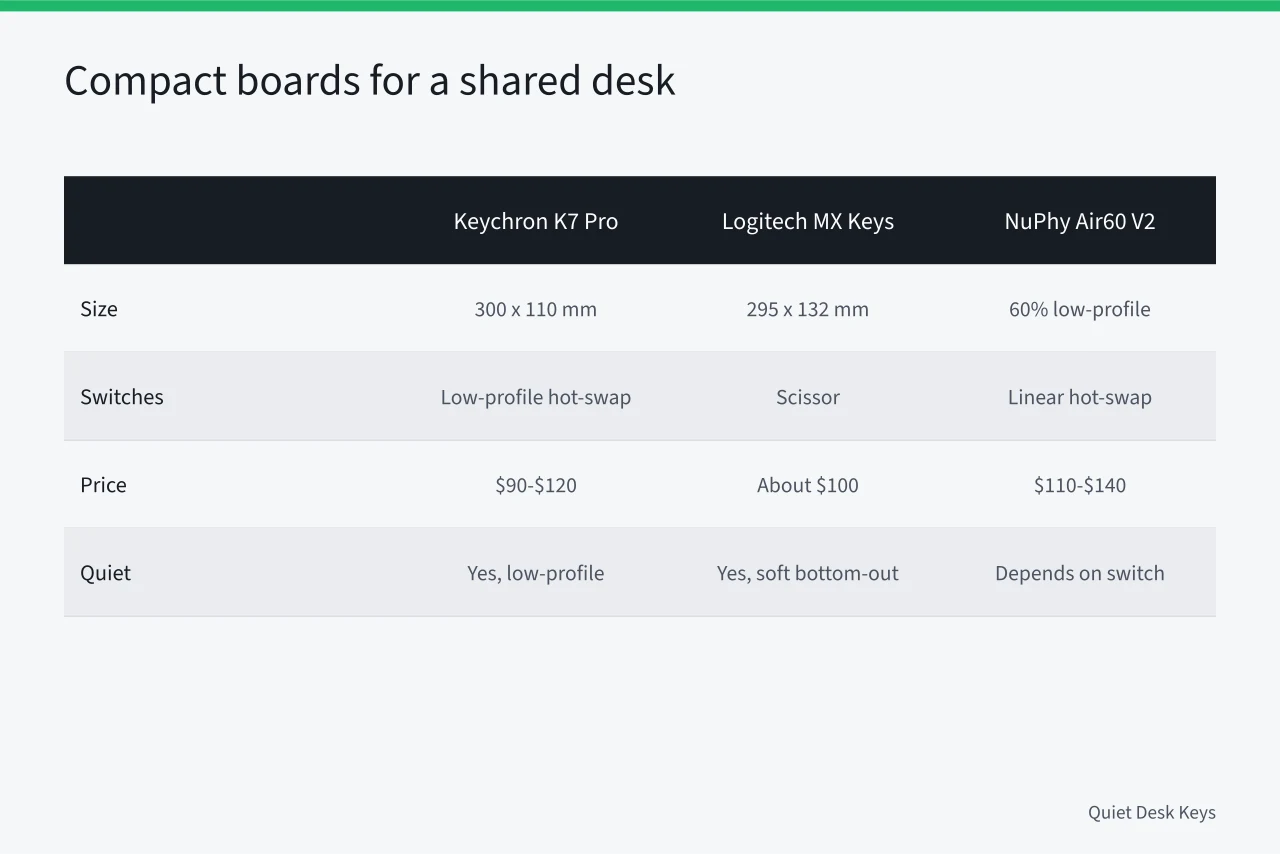
Logitech MX Keys Mini. A 60% scissor-switch board, about 295 x 132 mm, with backlighting and three-device pairing. Scissor switches bottom out softer than most mechanicals, which is why it keeps showing up in shared offices. List price is about $100, and it often sells near $80.
NuPhy Air60 V2. A 60% low-profile board with hot-swap sockets and a choice of linear switches, typically $110 to $140. Small enough to sit on a tray, and the switches are the part you change if the sound is wrong.
Apple Magic Keyboard. The smallest option here, about 279 x 115 mm, if you are already on macOS. About $99, or $149 with Touch ID. Flat, quiet, and no adjustment beyond the tilt.
Royal Kludge RK61. A 60% mechanical board at the low end of the price range, typically $40 to $60, with hot-swap sockets on the current revision. Confirm the revision before ordering, because the older one is soldered.
A separate number pad. If you enter figures daily, a standalone pad such as the Keychron K0 Pro lives in a drawer and comes out when needed, typically $45 to $65.
Mice and mats
A mouse needs the same depth as the board. The Logitech MX Anywhere 3S is small, lists at about $80, and tracks on most surfaces. The Razer Pro Click Mini folds flat for travel and lists near $80, often less on sale. Both are wireless, which removes the cable that stops a desk being cleared.
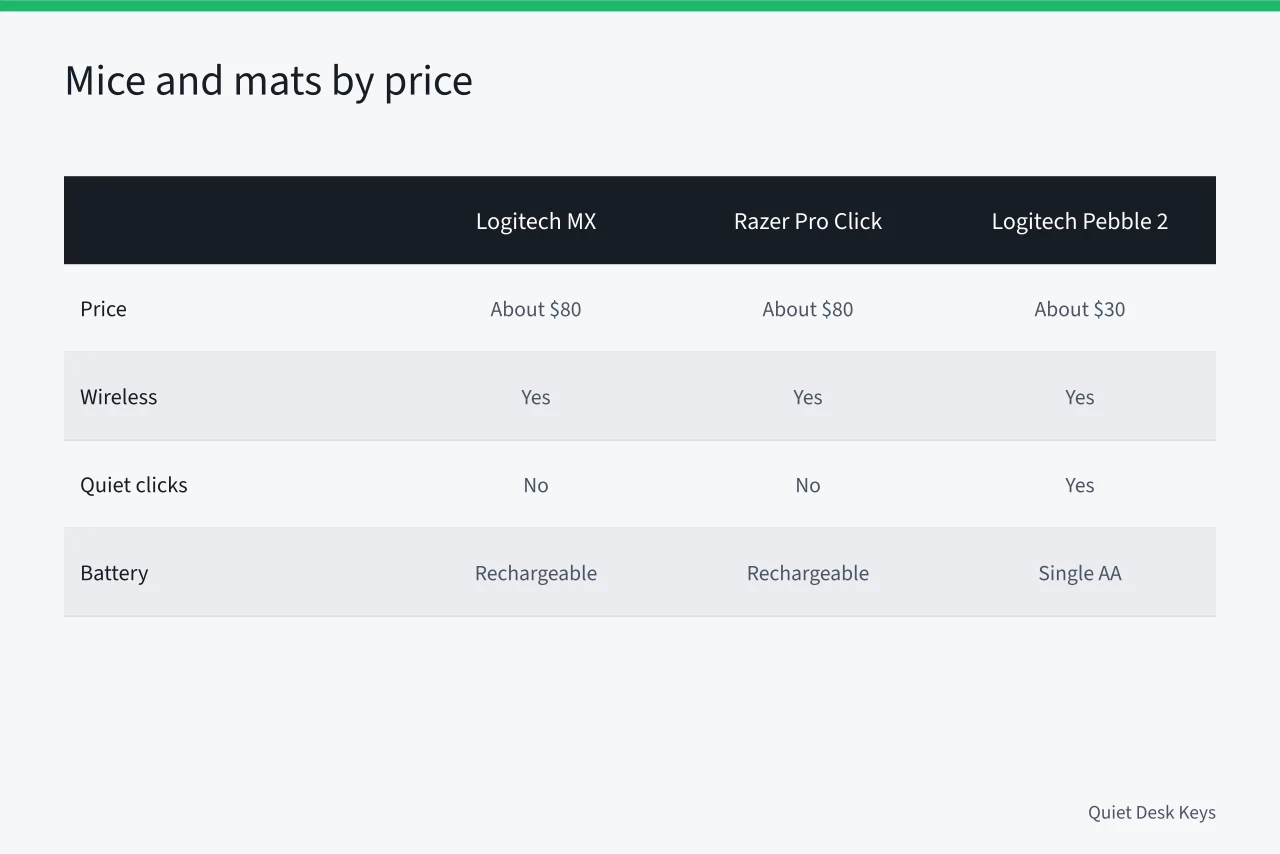
A cheaper pair works too. The Logitech Pebble 2 M350s sells around $30, and the Logitech M240 around $25. Both use quiet clicks and a single AA battery. Neither has the sensor or the build of the two above, but both still clear the desk.
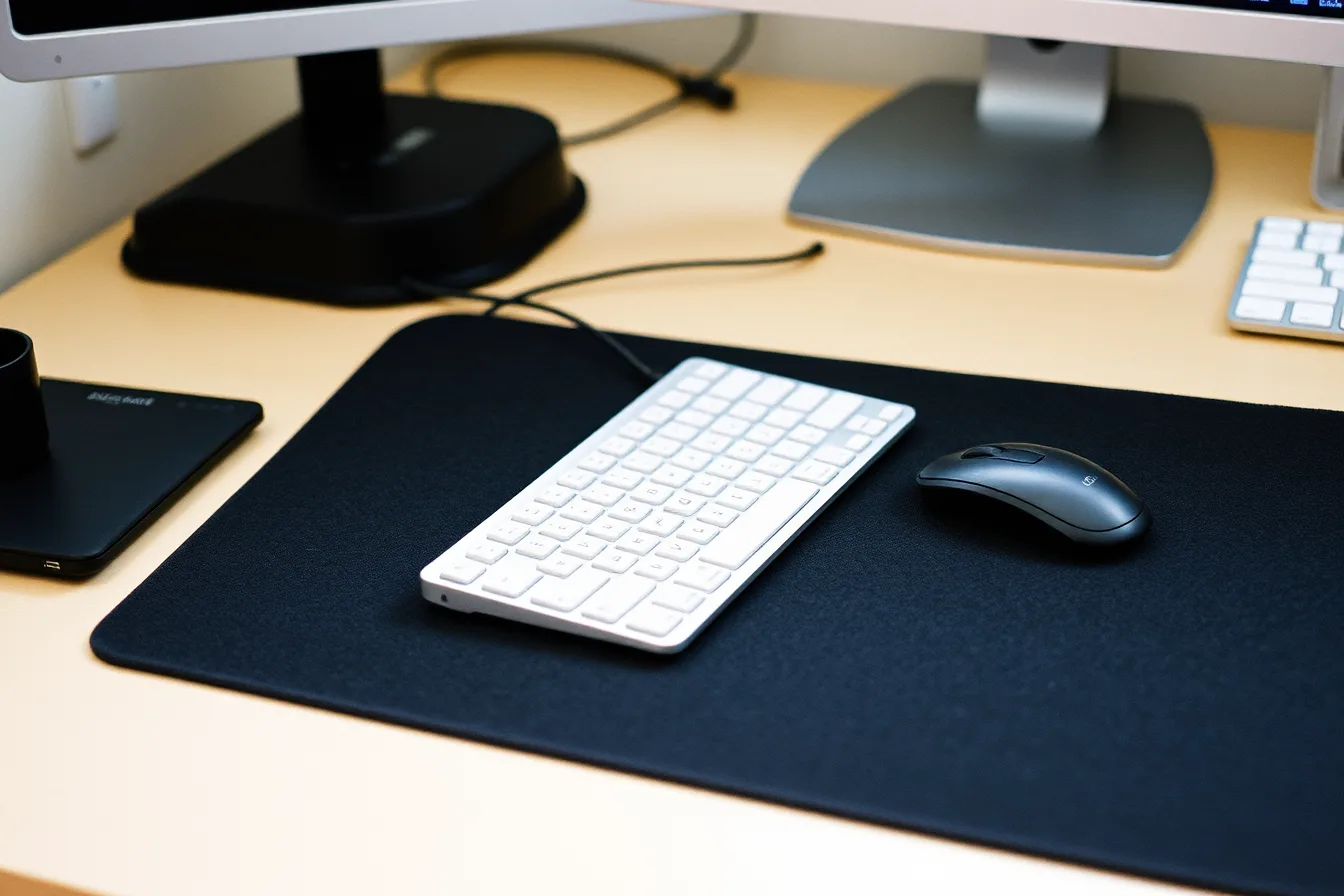
A dense mat does two jobs: it deadens the board's case resonance and protects a shared surface. Felt over rubber absorbs more than either alone. A Logitech Desk Mat runs about $20, and a wool felt pad from Grovemade typically starts near $100. Measure the thickness you can live with, because a thick mat raises your wrists.
Shared desks need range
The University of Pittsburgh's guidance on setting up a workstation draws the line clearly. One user means the arrangement can be optimized for that person, and adjustable height may be unnecessary.
Several users means the arrangement has to satisfy the smallest and tallest, and everyone between. The same page notes that daily duration decides how much any of this matters.
In practice: an adjustable chair, a monitor on an arm, and a board light enough to shift rather than one fixed at a compromise height. A North Bayou F80 arm typically costs $35 to $50, and an Ergotron LX runs closer to $150. An adjustable chair such as the Branch Ergonomic Chair usually lands between $300 and $400.
The room outranks the device
A study of 1,219 office workers who worked fully from home used path analysis to relate satisfaction with physical home workspace characteristics and support for work activities to mental health.
The workspace question is wider than wrists: a room that supports the work is worth more than any single item bought for it.
A worked small-room setup
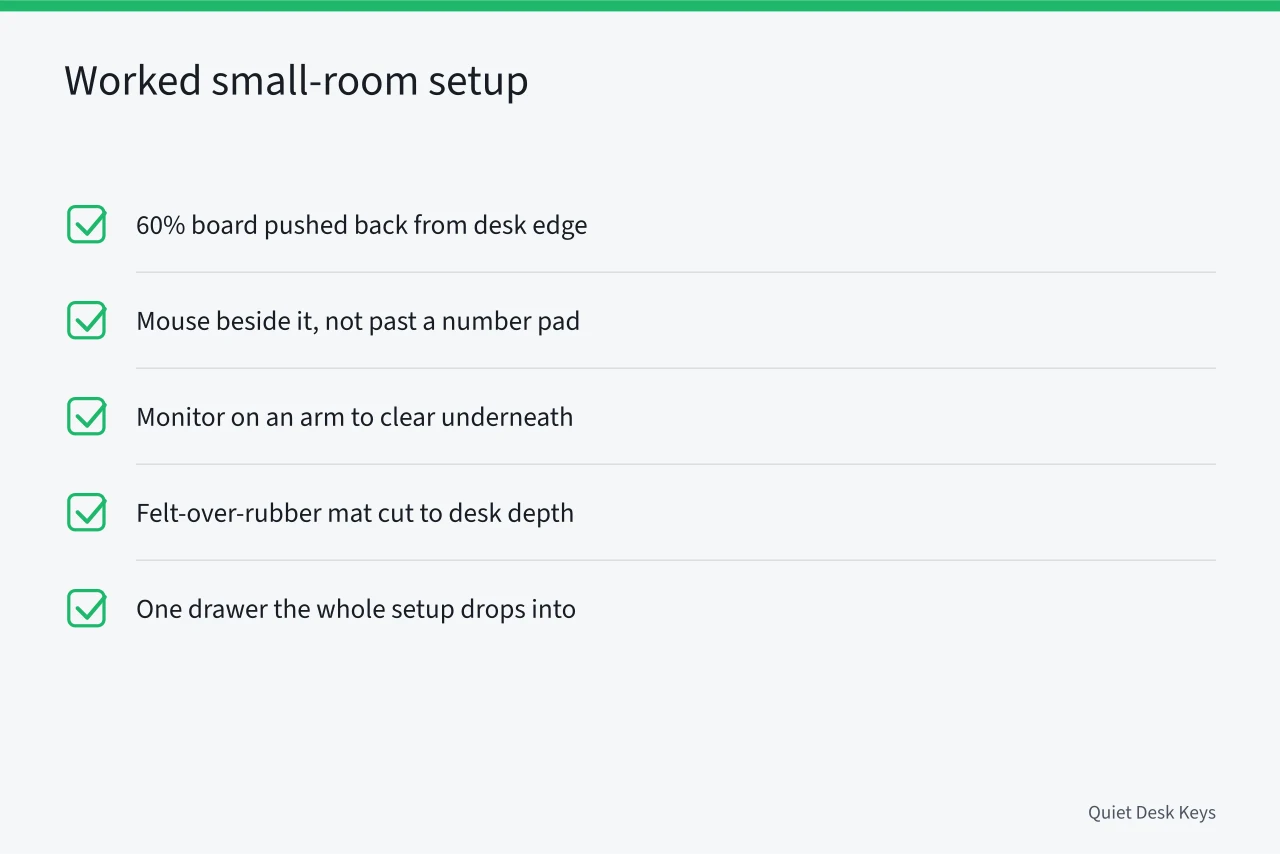
- A 60% board such as the Keychron K7 Pro or the NuPhy Air60 V2, pushed back from the desk edge.
- Mouse beside it, not out past a number pad.
- Monitor on an arm so the desk clears underneath.
- Felt-over-rubber mat under the board, cut to the desk depth you have.
- One drawer the whole setup drops into at the end of the day.
Design for setup time. A tray that holds board and mouse in place turns a five minute rearrangement into ten seconds. That is the difference between doing it and not.
Room-level changes are in reversible changes for a rented room, and maker-level checks are in judging a keyboard maker.
Common questions
Is a smaller keyboard less comfortable?
Not inherently. It removes keys rather than changing the ones you use most. The recovered depth often improves posture more than the missing keys cost.
Wireless or wired in a shared room?
Wireless, usually, because cables stop a desk being cleared. Keep one wired board, such as a Keychron C3 Pro at about $40, for the days the batteries die.
Can two people share one chair?
They can share an adjustable one. A fixed chair set for one person is the most common source of discomfort in a shared setup.
What does the setup cost in total?
A shared-desk input kit typically lands between $100 and $300. The board is the big variable: $40 to $60 for a Royal Kludge RK61, $90 to $140 for a Keychron or NuPhy. Add $25 to $80 for a mouse and $20 to $120 for a mat.
What about typing in a bedroom in the evening?
Move the desk off the shared wall, use a dense mat, and ask whether the last hour of work could happen elsewhere.